Custom HTTP integration
Who it's for
This integration is for teams with their own CMS, their own site or their own publishing pipeline — and who want approved Scriberry posts to land exactly where they belong. Typical users are companies that:
- run a custom-built CMS and don't use WordPress,
- run their blog on a static-site generator (Hugo, Astro, Eleventy) and want fresh posts to land in their Git repo automatically,
- want approved posts to hit Slack or Notion for an extra approval step before going live,
- have their own publishing pipeline and want Scriberry to be one of its sources.
In practice this integration requires someone with a developer background on your side — a person who can put together a small piece of code that receives posts from our server. The rest of this page is written for them.
How it works (no jargon)
- Your developer prepares a web address (URL) on your infrastructure that Scriberry will send posts to.
- You create the integration in Scriberry, paste that URL, and pick the content format (HTML or Markdown).
- Scriberry shows you a one-time signing secret — pass it to your developer so your server can verify that requests really came from us.
- From now on, every approved post is sent to that URL at its scheduled time. Your server receives it and does whatever you want — stores it in a database, commits to a repo, publishes it, sends a notification.
At any time you can also send a test post from the integration menu to confirm everything on your side works.
Create the integration in Scriberry
- Open your project → Integrations tab → click the Custom HTTP tile.

- Fill in the wizard:
- Name — anything you'll recognize later.
- URL — must start with
https://. - Content format —
HTML(default; Scriberry converts Markdown to HTML for you) orMarkdown(raw, with image references rewritten to absolute CDN URLs).
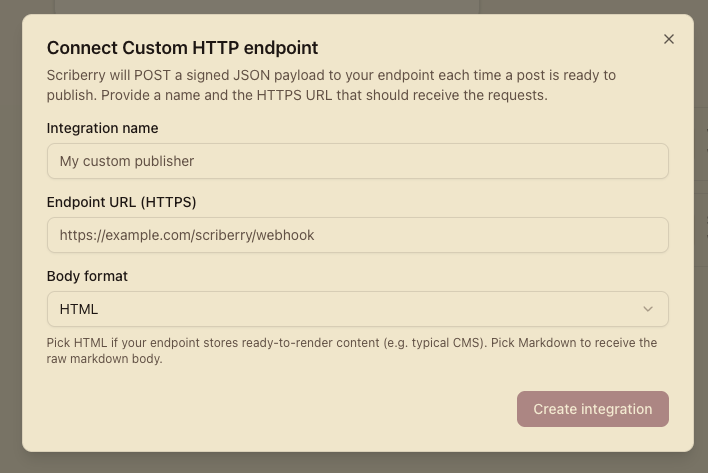
- Click Create. Scriberry generates a signing secret and shows it together with the URL (for confirmation).
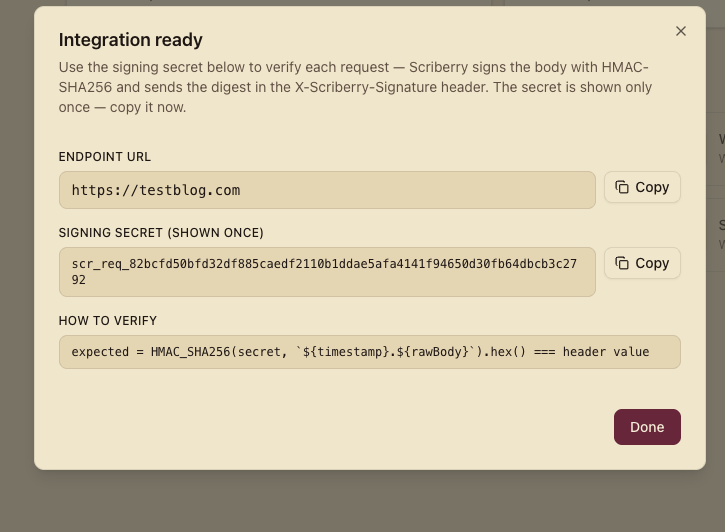
The secret is shown only once
Once you close this screen we won't show it again. Copy it now and hand it to your developer through a safe channel (password manager, encrypted message). If you lose it, use Generate new credentials on the integration card — the old secret stops working immediately.
The integration is Active right away — unlike WordPress it doesn't need a pairing handshake. The first request will go out as soon as the first approved post hits its publish time.
Technical reference — for developers
Everything below is aimed at the person who'll write and maintain the endpoint that receives posts.
Endpoint requirements
The endpoint Scriberry will call must:
- be reachable over HTTPS (plain HTTP is rejected by the wizard),
- accept
POSTwithContent-Type: application/json, - return a 2xx status on success — anything else triggers a retry with exponential backoff,
- respond within a few seconds — slow endpoints risk being treated as unavailable and retried.
Request headers
| Header | Description |
|---|---|
Content-Type |
Always application/json. |
X-Scriberry-Signature |
sha256=<hex> — HMAC SHA-256 of the request body, signed with the secret. |
X-Scriberry-Timestamp |
Sign time, Unix seconds. Use for replay defense. |
X-Scriberry-Event |
post.publish for real publishes and for "Test connection" calls. |
Body — the canonical payload
{
  "schema_version": "1.0",
  "post": {
    "id": "0193f8c3-...",
    "title": "Why time-boxing beats todo lists",
    "slug": "time-boxing-beats-todo-lists",
    "excerpt": "Short summary suitable for <meta name=\"description\">.",
    "content_html": "<p>The full body…</p>",
    "content_format": "html",
    "language": "en",
    "scheduled_for": "2026-06-01T09:00:00.000Z"
  },
  "target": null,
  "media": {
    "featured": {
      "ref": "01940ab2-...",
      "url": "https://cdn.scriberry.ai/posts/0193f8c3.../cover.webp",
      "alt": "A planner with three time blocks circled in red",
      "mime": "image/webp"
    },
    "inline": []
  },
  "idempotency_key": "0193f8c3-..._v1"
}
target is always null for Custom HTTP — WordPress-specific hints are not relevant here. idempotency_key is stable across retries — store it on your side and short-circuit if you see the same key twice.
If you picked Markdown in the wizard, content_html is replaced by content_markdown and content_format is set to "markdown".
Verifying the signature
The signature is computed as:
On the endpoint side:
- Strip the
sha256=prefix fromX-Scriberry-Signature. - Check that
X-Scriberry-Timestampisn't older than your chosen window — 5 minutes is a safe default. - Compute the expected signature on the server side and compare it in constant time with the value from the header.
- Sign/verify against the raw body bytes, not a re-serialized JSON. Any whitespace difference breaks the HMAC.
Node.js (Express)
import express from "express";
import crypto from "node:crypto";

const SECRET = process.env.SCRIBERRY_SECRET;
const app = express();

// Important: we need the raw body bytes to verify the signature.
app.use("/scriberry/webhook", express.raw({ type: "application/json" }));

function verify(req) {
  const sig = (req.headers["x-scriberry-signature"] || "").replace(
    /^sha256=/,
    "",
  );
  const ts = req.headers["x-scriberry-timestamp"];
  if (!sig || !ts) return false;

  const ageSec = Math.abs(Date.now() / 1000 - Number(ts));
  if (ageSec > 300) return false;

  const expected = crypto
    .createHmac("sha256", SECRET)
    .update(`${ts}.`)
    .update(req.body) // req.body is a Buffer thanks to express.raw()
    .digest("hex");

  const a = Buffer.from(sig, "hex");
  const b = Buffer.from(expected, "hex");
  return a.length === b.length && crypto.timingSafeEqual(a, b);
}

app.post("/scriberry/webhook", async (req, res) => {
  if (!verify(req)) return res.status(401).send("invalid signature");

  const payload = JSON.parse(req.body.toString("utf8"));

  // Idempotency — a single post shouldn't go through twice.
  if (await alreadyProcessed(payload.idempotency_key)) {
    return res.status(200).send("duplicate, skipped");
  }

  try {
    await publish(payload); // e.g. write to CMS, commit to repo, post to Slack
    await markProcessed(payload.idempotency_key);
    res.status(200).send("ok");
  } catch (err) {
    console.error(err);
    res.status(500).send("publish failed");
  }
});

app.listen(3000);
Python (FastAPI)
import hmac, hashlib, time, os, json
from fastapi import FastAPI, Request, HTTPException

SECRET = os.environ["SCRIBERRY_SECRET"].encode()
app = FastAPI()

def verify(headers, raw_body: bytes) -> bool:
    sig = headers.get("x-scriberry-signature", "").removeprefix("sha256=")
    ts = headers.get("x-scriberry-timestamp", "")
    if not sig or not ts:
        return False

    if abs(time.time() - int(ts)) > 300:
        return False

    expected = hmac.new(
        SECRET,
        f"{ts}.".encode() + raw_body,
        hashlib.sha256,
    ).hexdigest()
    return hmac.compare_digest(sig, expected)

@app.post("/scriberry/webhook")
async def webhook(request: Request):
    raw_body = await request.body()
    if not verify(request.headers, raw_body):
        raise HTTPException(status_code=401, detail="invalid signature")

    payload = json.loads(raw_body)

    if await already_processed(payload["idempotency_key"]):
        return {"status": "duplicate, skipped"}

    try:
        await publish(payload)  # e.g. write to CMS, commit to repo, post to Slack
        await mark_processed(payload["idempotency_key"])
        return {"status": "ok"}
    except Exception:
        raise HTTPException(status_code=500, detail="publish failed")
Testing the connection
Before the first real publish window arrives, use the built-in test:
- On the integration card, open the three-dot menu → Test connection.
- Scriberry sends a test payload to your endpoint with an extra
_meta.is_test: truefield (10-second timeout). - The dialog reports:
- HTTP status code,
- round-trip latency in ms,
- a short snippet of your response body (up to 500 characters).
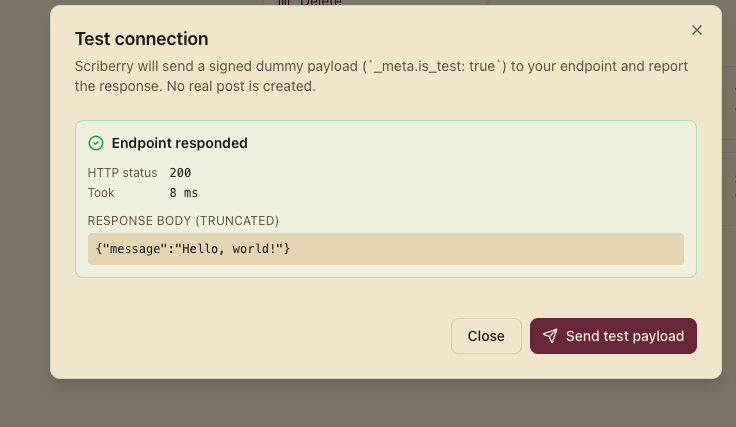
The test does not change the integration's status or its last error — a failing test is a hint, not a hard error. Real publishes have their own retry and error-tracking logic.
What happens at publish time
- Every few minutes Scriberry scans for approved posts whose publish time is in the past and which haven't been published through this integration yet.
- For each, a publish job is enqueued.
- The worker decrypts your secret, builds the payload (in your chosen format), signs it, and
POSTs it to your endpoint with the headers described above. - 2xx response → the publication is marked as done; the counter and last-sync timestamp on the integration card update.
- 4xx/5xx, network error or timeout → we retry with exponential backoff. Once retries are exhausted, the publication is marked as failed and the error message surfaces on the integration card.
Content format — HTML or Markdown
| Format | When to pick it |
|---|---|
HTML |
Most CMSes — custom WordPress, Notion, Webflow CMS API, anything that consumes HTML directly. |
Markdown |
Static-site generators (Hugo, Astro, Eleventy), git-based publishing flows, internal tooling that prefers source-form content. |
Either way, images inside the body are referenced as absolute URLs on our CDN. You can keep them as-is or download and rewrite the links to your own storage before publishing.
Rotating the secret
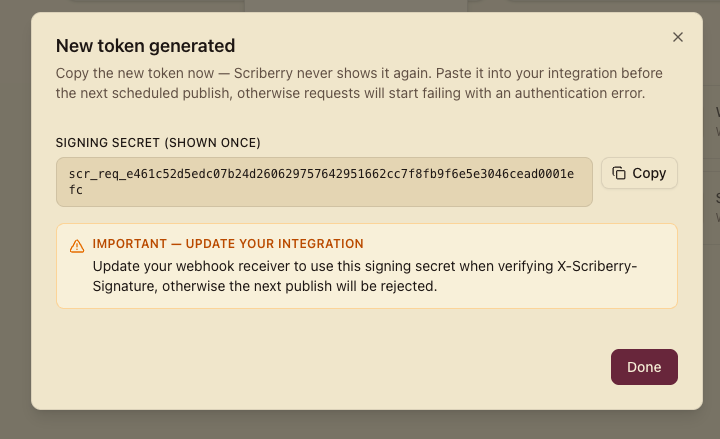
Use Generate new credentials from the integration menu. The previous secret stops working immediately, so:
- Generate the new secret.
- Update it on your side (environment variable, secret manager, etc.).
- Restart the process or reload the config — whichever your setup uses.
The integration's status doesn't change — it stays Active.
Troubleshooting
- Constant
401 invalid signature— the most common cause is verifying the signature against a parsed-and-reserialized body. Sign the raw bytes. In Express, useexpress.raw()instead ofexpress.json()for this endpoint. The second common cause is clock drift on your server — check NTP. - Timeouts — your handler does too much synchronously (e.g. downloads images from the CDN on every request). Respond
200fast, push the heavy work to a queue. - Duplicates — implement idempotency based on
idempotency_key. Without it, a retried publish can appear on your side several times. - Test works, real publishes don't — confirm the production endpoint has the new secret after rotation.