Integrations
An integration is the bridge between Scriberry and the place where your blog actually lives — WordPress, your own CMS, a site built with Hugo or Astro, or any tool your IT team can hook a pipe into. Once a project has an integration set up, every approved post publishes itself, on the date you scheduled — no copy-pasting, no Sunday-evening reminders.
This page is the overview. For step-by-step instructions head to:
- WordPress — install our plugin on your site, paste one key, done.
- Your own service (Custom HTTP) — the option for teams that have a developer and want full control over where and how content lands.
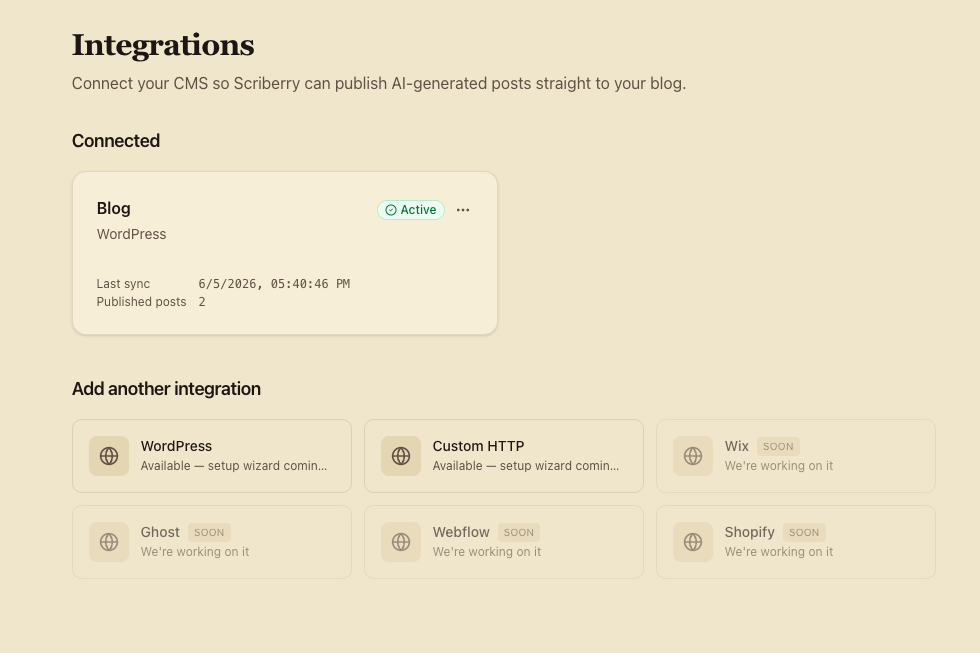
What Scriberry can connect to
| Platform | Availability | In one sentence |
|---|---|---|
| WordPress | Available | A plugin on your site pulls new posts from Scriberry and publishes them. |
| Your own service (HTTP) | Available | Scriberry sends the ready post to an address provided by your developer. |
| Wix | Coming soon | Leave your email on the tile and we'll notify you when it's ready. |
| Ghost | Coming soon | Same as above. |
| Webflow | Coming soon | Same as above. |
| Shopify | Coming soon | Same as above. |
One integration per project
A single project can have one publishing integration active at a time. To switch where your posts go (e.g. move from WordPress to your own CMS), delete the existing integration first — it takes one click and frees the slot immediately. The full history of past publications stays in the project, so you lose nothing.
We're working on letting one project publish to several places at once in the future.
What Scriberry sends to your site
Whichever platform you choose, every scheduled post arrives as a complete package. You receive:
- the title and the URL slug,
- the body, ready to publish,
- a short summary (excerpt) for the meta description,
- the cover image,
- every image embedded in the body,
- the date and time the post was scheduled for.
Images come as links to our fast content-delivery network (CDN) — your site downloads them on its own, at publish time.
Integration statuses
Every integration has one of four states, visible on the integration card:
- Awaiting connection — the integration exists in Scriberry, but the other side (e.g. the WordPress plugin) hasn't reached out to us yet. Normal right after creation.
- Active — everything works; posts will publish on schedule.
- Error — the last publication failed. The card shows what went wrong so you can react quickly.
- Paused — you turned it off manually. Posts are still approved inside Scriberry, but nothing leaves for your site until you turn it back on.
What you can do with an active integration
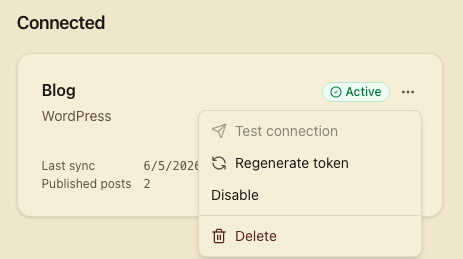
Each integration card has a menu under the three-dot icon (top right). You'll find:
- Test connection (Your own service only) — Scriberry sends a "dummy" post to your site and shows whether your site responded correctly. Great for confirming everything's ready before the first real scheduled publish.
- Generate new credentials — issues a new access key. The old one stops working immediately, so remember to paste the new one in the right place (e.g. the WordPress plugin settings) right away.
- Pause / Resume — temporarily disables publishing, without losing settings or history.
- Delete — safe removal. For safety we'll ask you to retype its name (GitHub-style), so you can't trigger this by accident. Frees the slot for a new integration.
Security and access keys
The access key (or signing secret — depending on the integration) is shown to you exactly once — at creation time and again after each regeneration. We can't recover it later, and nobody with database access will see it in readable form either.
Treat the key like a password: copy it the moment we show it, and keep it in a password manager or another safe place. If you lose it or suspect someone has seen it, generate a new one from the integration menu — the old one stops working immediately.
Next steps
- Set up a WordPress integration.
- Set up a Custom HTTP integration.